IPsecのIKEのアルゴリズムの設定方法
目次
こんにちは、こんばんわ。
以前、UbuntuのVPN接続の設定の際に引っかかったところを調べてみた。
前提・背景
VPNサーバ作ったので、いろんなOSから接続を試していたのだが、ubuntuからの接続の際にL2TPの設定で理解できないところがあったので、少し調べてみた、というのが背景である。
わからなかったところは、IKEのフェーズ1とフェーズ2のアルゴリズムに関してだ。
具体的な接続の際の記事は以下を参照。
IPsecとは
まずそもそもIPsec(IP Security Protocol)とは何か。そのままなのだが、インターネット層の通信のセキュリティを確保するためのプロトコルである。なおIPsecは複数のプロトコルから構成されており、AH、ESP、IKEなどが中心となるプロトコルである。
IKEとは
IPsecを構成するプロトコルのうちの一つである、IKEとは何か。
IKEはInternet Key Excangeの略だ。こいつが暗号化のための共通鍵を生成するために必要なのだ。
IKEにはフェーズ1とフェーズ2の2段階あり、暗号化アルゴリズムや認証アルゴリズムを折衝し、IPsecのトンネルを設定する。
各々のフェーズで何が行われるのか。
フェーズ1
フェーズ1ではPSK(Pre-Shared Key)認証などの方式を用いて、通信の相手が正しいかどうかの認証と、フェーズ2で行うアルゴリズムや共通鍵の生成を行う。
通信の相手が正しいことが確認できるとフェーズ1のトンネルが設定される。
フェーズ2
フェーズ2では、フェーズ1で設定されたトンネルを用いて、再度鍵の交換を行いトンネルを設定する。
フェーズ2では、フェーズ1で生成した暗号化や認証を行う鍵を用いて通信を行うため安全に通信することができるというわけだ。
IKE アルゴリズムの確認
VPNサーバにどのようなアルゴリズムを使っているかを聞いてみようということで、スクリプトを走らせて行こう。
スクリプトは以下を参考にした。
nm-l2tp/NetworkManager-l2tp Known Issues: https://github.com/nm-l2tp/NetworkManager-l2tp/wiki/Known-Issues
ike-scanのインストール
$ sudo apt-get update
$ sudo apt-get install ike-scan
スクリプトの実行/結果
実行スクリプトは以下。
#!/bin/sh

# Encryption algorithms: 3des=5, aes128=7/128, aes192=7/192, aes256=7/256
ENCLIST="5 7/128 7/192 7/256"
# Hash algorithms: md5=1, sha1=2, sha256=5, sha384=6, sha512=7
HASHLIST="1 2 5 6 7"
# Diffie-Hellman groups: 1, 2, 5, 14, 15, 19, 20, 21
GROUPLIST="1 2 5 14 15 19 20 21"
# Authentication method: Preshared Key=1, RSA signatures=3
AUTHLIST="1 3"

for ENC in $ENCLIST; do
   for HASH in $HASHLIST; do
       for GROUP in $GROUPLIST; do
          for AUTH in $AUTHLIST; do
             echo ike-scan --trans=$ENC,$HASH,$AUTH,$GROUP -M "$@"
             ike-scan --trans=$ENC,$HASH,$AUTH,$GROUP -M "$@"
          done
      done
   done
done
スクリプトの肝は17行目の ike-scan --trans=$ENC,$HASH,$AUTH,$GROUP -M "$@" だ。
ike-scanのヘルプには以下のようにある。
$ ike-scan --help

--trans= or -a 	Use custom transform  instead of default set.
            You can use this option more than once to send
            an arbitrary number of custom transforms.
            There are two ways to specify the transform:
            The new way, where you specify the attribute/value
            pairs, and the old way where you specify the values
            for a fixed list of attributes.
            For the new method, the transform  is specified as
            (attr=value, attr=value, ...)
            Where "attr" is the attribute number, and "value" is
            the value to assign to that attribute.
            For a basic attribute, specify the value as a decimal
            number; for a variable length attribute, specify the
            value as a hex number prefixed with 0x. You can specify
            an arbitary number of attribute/value pairs.
            See RFC 2409 Appendix A for details of the attributes
            and values.
            Note that brackets are special to some shells, so you
            may need to quote them, e.g.
            --trans="(1=1,2=2,3=3,4=4)". For example,
            --trans=(1=1,2=2,3=1,4=2) specifies
            Enc=DES-CBC, Hash=SHA1, Auth=shared key, DH Group=2;
            --trans=(1=7,14=128,2=1,3=3,4=5) specifies
            Enc=AES/128, Hash=MD5, Auth=RSA sig, DH Group=5 and
            --trans=(1=5,2=1,3=1,4=1,11=1,12=0x00007080) specifies
            Enc=3DES-CBC, Hash=MD5, Auth=shared key, DH Group=1,
            Lifetime=28800 seconds as a 4-byte variable attribute.
            For the old method, the transform  is specified as
            enc[/len],hash,auth,group.
            Where enc is the encryption algorithm,
            len is the key length for variable length ciphers,
            hash is the hash algorithm, and group is the DH Group.
            For example, --trans=5,2,1,2 specifies
            Enc=3DES-CBC, Hash=SHA1, Auth=shared key, DH Group=2;
            and --trans=7/256,1,1,5 specifies
            Enc=AES-256, Hash=MD5, Auth=shared key, DH Group=5.
            This option is not yet supported for IKEv2.
デフォルトのセットではなく、カスタムしたセットを利用できるとある。つまりfor文でリストを回してENC、HASH、GROUP、AUTHの値の全てのセットでアルゴリズムを確認する、というスクリプトになっていることがわかる。
ファイル名はike-scan.shとしてファイルを保存する。
ファイルが保存できたら、ike-scanを行うためにはUDPの500番ポートを開ける必要があるので、ipsecを停止させる。
$ sudo ipsec stop
スクリプトの実行権限を与える。
$ chmod a+rx ./ike-scan.sh
123.54.76.9となっているIPアドレスをVPNサーバのIPアドレスに変更する。僕の場合はsoftetherを動かしているラズパイのIPアドレスを指定する。
$ sudo ./ike-scan.sh 123.54.76.9 | grep SA=
結果が以下のように順次表示される。
$ sudo ./ike-scan.sh 192.168.xx.yy |grep SA=
    SA=(Enc=3DES Hash=MD5 Auth=PSK Group=1:modp768 LifeType=Seconds LifeDuration=28800)
    SA=(Enc=3DES Hash=MD5 Auth=PSK Group=2:modp1024 LifeType=Seconds LifeDuration=28800)
    SA=(Enc=3DES Hash=MD5 Auth=PSK Group=5:modp1536 LifeType=Seconds LifeDuration=28800)
    SA=(Enc=3DES Hash=MD5 Auth=PSK Group=14:modp2048 LifeType=Seconds LifeDuration=28800)
    SA=(Enc=3DES Hash=MD5 Auth=PSK Group=15:modp3072 LifeType=Seconds LifeDuration=28800)
    SA=(Enc=3DES Hash=SHA1 Auth=PSK Group=1:modp768 LifeType=Seconds LifeDuration=28800)
    SA=(Enc=3DES Hash=SHA1 Auth=PSK Group=2:modp1024 LifeType=Seconds LifeDuration=28800)
    SA=(Enc=3DES Hash=SHA1 Auth=PSK Group=5:modp1536 LifeType=Seconds LifeDuration=28800)
    SA=(Enc=3DES Hash=SHA1 Auth=PSK Group=14:modp2048 LifeType=Seconds LifeDuration=28800)
    SA=(Enc=3DES Hash=SHA1 Auth=PSK Group=15:modp3072 LifeType=Seconds LifeDuration=28800)
    SA=(Enc=3DES Hash=SHA2-384 Auth=PSK Group=1:modp768 LifeType=Seconds LifeDuration=28800)
    SA=(Enc=3DES Hash=SHA2-384 Auth=PSK Group=2:modp1024 LifeType=Seconds LifeDuration=28800)
    SA=(Enc=3DES Hash=SHA2-384 Auth=PSK Group=5:modp1536 LifeType=Seconds LifeDuration=28800)
    SA=(Enc=3DES Hash=SHA2-384 Auth=PSK Group=14:modp2048 LifeType=Seconds LifeDuration=28800)
    SA=(Enc=3DES Hash=SHA2-384 Auth=PSK Group=15:modp3072 LifeType=Seconds LifeDuration=28800)
    SA=(Enc=3DES Hash=SHA2-512 Auth=PSK Group=1:modp768 LifeType=Seconds LifeDuration=28800)
    SA=(Enc=3DES Hash=SHA2-512 Auth=PSK Group=2:modp1024 LifeType=Seconds LifeDuration=28800)
    SA=(Enc=3DES Hash=SHA2-512 Auth=PSK Group=5:modp1536 LifeType=Seconds LifeDuration=28800)
    SA=(Enc=3DES Hash=SHA2-512 Auth=PSK Group=14:modp2048 LifeType=Seconds LifeDuration=28800)
    SA=(Enc=3DES Hash=SHA2-512 Auth=PSK Group=15:modp3072 LifeType=Seconds LifeDuration=28800)
    SA=(Enc=AES Hash=MD5 Auth=PSK Group=1:modp768 LifeType=Seconds LifeDuration=28800 KeyLength=128)
    SA=(Enc=AES Hash=MD5 Auth=PSK Group=2:modp1024 LifeType=Seconds LifeDuration=28800 KeyLength=128)
    SA=(Enc=AES Hash=MD5 Auth=PSK Group=5:modp1536 LifeType=Seconds LifeDuration=28800 KeyLength=128)
    SA=(Enc=AES Hash=MD5 Auth=PSK Group=14:modp2048 LifeType=Seconds LifeDuration=28800 KeyLength=128)
    SA=(Enc=AES Hash=MD5 Auth=PSK Group=15:modp3072 LifeType=Seconds LifeDuration=28800 KeyLength=128)
    SA=(Enc=AES Hash=SHA1 Auth=PSK Group=1:modp768 LifeType=Seconds LifeDuration=28800 KeyLength=128)
    SA=(Enc=AES Hash=SHA1 Auth=PSK Group=2:modp1024 LifeType=Seconds LifeDuration=28800 KeyLength=128)
    SA=(Enc=AES Hash=SHA1 Auth=PSK Group=5:modp1536 LifeType=Seconds LifeDuration=28800 KeyLength=128)
    SA=(Enc=AES Hash=SHA1 Auth=PSK Group=14:modp2048 LifeType=Seconds LifeDuration=28800 KeyLength=128)
    SA=(Enc=AES Hash=SHA1 Auth=PSK Group=15:modp3072 LifeType=Seconds LifeDuration=28800 KeyLength=128)
    SA=(Enc=AES Hash=SHA2-384 Auth=PSK Group=1:modp768 LifeType=Seconds LifeDuration=28800 KeyLength=128)
    SA=(Enc=AES Hash=SHA2-384 Auth=PSK Group=2:modp1024 LifeType=Seconds LifeDuration=28800 KeyLength=128)
    SA=(Enc=AES Hash=SHA2-384 Auth=PSK Group=5:modp1536 LifeType=Seconds LifeDuration=28800 KeyLength=128)
    SA=(Enc=AES Hash=SHA2-384 Auth=PSK Group=14:modp2048 LifeType=Seconds LifeDuration=28800 KeyLength=128)
    SA=(Enc=AES Hash=SHA2-384 Auth=PSK Group=15:modp3072 LifeType=Seconds LifeDuration=28800 KeyLength=128)
    SA=(Enc=AES Hash=SHA2-512 Auth=PSK Group=1:modp768 LifeType=Seconds LifeDuration=28800 KeyLength=128)
    SA=(Enc=AES Hash=SHA2-512 Auth=PSK Group=2:modp1024 LifeType=Seconds LifeDuration=28800 KeyLength=128)
    SA=(Enc=AES Hash=SHA2-512 Auth=PSK Group=5:modp1536 LifeType=Seconds LifeDuration=28800 KeyLength=128)
    SA=(Enc=AES Hash=SHA2-512 Auth=PSK Group=14:modp2048 LifeType=Seconds LifeDuration=28800 KeyLength=128)
    SA=(Enc=AES Hash=SHA2-512 Auth=PSK Group=15:modp3072 LifeType=Seconds LifeDuration=28800 KeyLength=128)
    SA=(Enc=AES Hash=MD5 Auth=PSK Group=1:modp768 LifeType=Seconds LifeDuration=28800 KeyLength=192)
    SA=(Enc=AES Hash=MD5 Auth=PSK Group=2:modp1024 LifeType=Seconds LifeDuration=28800 KeyLength=192)
    SA=(Enc=AES Hash=MD5 Auth=PSK Group=5:modp1536 LifeType=Seconds LifeDuration=28800 KeyLength=192)
    SA=(Enc=AES Hash=MD5 Auth=PSK Group=14:modp2048 LifeType=Seconds LifeDuration=28800 KeyLength=192)
    SA=(Enc=AES Hash=MD5 Auth=PSK Group=15:modp3072 LifeType=Seconds LifeDuration=28800 KeyLength=192)
    SA=(Enc=AES Hash=SHA1 Auth=PSK Group=1:modp768 LifeType=Seconds LifeDuration=28800 KeyLength=192)
    SA=(Enc=AES Hash=SHA1 Auth=PSK Group=2:modp1024 LifeType=Seconds LifeDuration=28800 KeyLength=192)
    SA=(Enc=AES Hash=SHA1 Auth=PSK Group=5:modp1536 LifeType=Seconds LifeDuration=28800 KeyLength=192)
    SA=(Enc=AES Hash=SHA1 Auth=PSK Group=14:modp2048 LifeType=Seconds LifeDuration=28800 KeyLength=192)
    SA=(Enc=AES Hash=SHA1 Auth=PSK Group=15:modp3072 LifeType=Seconds LifeDuration=28800 KeyLength=192)
    SA=(Enc=AES Hash=SHA2-384 Auth=PSK Group=1:modp768 LifeType=Seconds LifeDuration=28800 KeyLength=192)
    SA=(Enc=AES Hash=SHA2-384 Auth=PSK Group=2:modp1024 LifeType=Seconds LifeDuration=28800 KeyLength=192)
    SA=(Enc=AES Hash=SHA2-384 Auth=PSK Group=5:modp1536 LifeType=Seconds LifeDuration=28800 KeyLength=192)
    SA=(Enc=AES Hash=SHA2-384 Auth=PSK Group=14:modp2048 LifeType=Seconds LifeDuration=28800 KeyLength=192)
    SA=(Enc=AES Hash=SHA2-384 Auth=PSK Group=15:modp3072 LifeType=Seconds LifeDuration=28800 KeyLength=192)
    SA=(Enc=AES Hash=SHA2-512 Auth=PSK Group=1:modp768 LifeType=Seconds LifeDuration=28800 KeyLength=192)
    SA=(Enc=AES Hash=SHA2-512 Auth=PSK Group=2:modp1024 LifeType=Seconds LifeDuration=28800 KeyLength=192)
    SA=(Enc=AES Hash=SHA2-512 Auth=PSK Group=5:modp1536 LifeType=Seconds LifeDuration=28800 KeyLength=192)
    SA=(Enc=AES Hash=SHA2-512 Auth=PSK Group=14:modp2048 LifeType=Seconds LifeDuration=28800 KeyLength=192)
    SA=(Enc=AES Hash=SHA2-512 Auth=PSK Group=15:modp3072 LifeType=Seconds LifeDuration=28800 KeyLength=192)
    SA=(Enc=AES Hash=MD5 Auth=PSK Group=1:modp768 LifeType=Seconds LifeDuration=28800 KeyLength=256)
    SA=(Enc=AES Hash=MD5 Auth=PSK Group=2:modp1024 LifeType=Seconds LifeDuration=28800 KeyLength=256)
    SA=(Enc=AES Hash=MD5 Auth=PSK Group=5:modp1536 LifeType=Seconds LifeDuration=28800 KeyLength=256)
    SA=(Enc=AES Hash=MD5 Auth=PSK Group=14:modp2048 LifeType=Seconds LifeDuration=28800 KeyLength=256)
    SA=(Enc=AES Hash=MD5 Auth=PSK Group=15:modp3072 LifeType=Seconds LifeDuration=28800 KeyLength=256)
    SA=(Enc=AES Hash=SHA1 Auth=PSK Group=1:modp768 LifeType=Seconds LifeDuration=28800 KeyLength=256)
    SA=(Enc=AES Hash=SHA1 Auth=PSK Group=2:modp1024 LifeType=Seconds LifeDuration=28800 KeyLength=256)
    SA=(Enc=AES Hash=SHA1 Auth=PSK Group=5:modp1536 LifeType=Seconds LifeDuration=28800 KeyLength=256)
    SA=(Enc=AES Hash=SHA1 Auth=PSK Group=14:modp2048 LifeType=Seconds LifeDuration=28800 KeyLength=256)
    SA=(Enc=AES Hash=SHA1 Auth=PSK Group=15:modp3072 LifeType=Seconds LifeDuration=28800 KeyLength=256)
    SA=(Enc=AES Hash=SHA2-384 Auth=PSK Group=1:modp768 LifeType=Seconds LifeDuration=28800 KeyLength=256)
    SA=(Enc=AES Hash=SHA2-384 Auth=PSK Group=2:modp1024 LifeType=Seconds LifeDuration=28800 KeyLength=256)
    SA=(Enc=AES Hash=SHA2-384 Auth=PSK Group=5:modp1536 LifeType=Seconds LifeDuration=28800 KeyLength=256)
    SA=(Enc=AES Hash=SHA2-384 Auth=PSK Group=14:modp2048 LifeType=Seconds LifeDuration=28800 KeyLength=256)
    SA=(Enc=AES Hash=SHA2-384 Auth=PSK Group=15:modp3072 LifeType=Seconds LifeDuration=28800 KeyLength=256)
    SA=(Enc=AES Hash=SHA2-512 Auth=PSK Group=1:modp768 LifeType=Seconds LifeDuration=28800 KeyLength=256)
    SA=(Enc=AES Hash=SHA2-512 Auth=PSK Group=2:modp1024 LifeType=Seconds LifeDuration=28800 KeyLength=256)
    SA=(Enc=AES Hash=SHA2-512 Auth=PSK Group=5:modp1536 LifeType=Seconds LifeDuration=28800 KeyLength=256)
    SA=(Enc=AES Hash=SHA2-512 Auth=PSK Group=14:modp2048 LifeType=Seconds LifeDuration=28800 KeyLength=256)
    SA=(Enc=AES Hash=SHA2-512 Auth=PSK Group=15:modp3072 LifeType=Seconds LifeDuration=28800 KeyLength=256)
この出力結果からフェーズ1で使用するアルゴリズムがわかる。
例えば30行目の
SA=(Enc=AES Hash=SHA1 Auth=PSK Group=14:modp2048 LifeType=Seconds LifeDuration=28800 KeyLength=128)
からは「aes128-sha1-modp2048」のアルゴリズムが使用できることがわかる。
また8行目の
SA=(Enc=3DES Hash=SHA1 Auth=PSK Group=2:modp1024 LifeType=Seconds LifeDuration=28800)
からは「3des-sha1-modp1024」のアルゴリズムが使用できることがわかる。※これは僕が以前適当に設定した値だ。たまたま合っていたようだ。
見比べればアルゴリズムの文字列の法則がわかるが、
「"暗号化アルゴリズム""keyの長さ"-"ハッシュアルゴリズム"-"diffie-hellman group"」のように並べればいいことがわかる。
なお、フェーズ2で使用するアルゴリズムはaes256-sha1,aes128-sha1,3des-sha1のいずれかが推奨とのこと。
phase1, phase2のアルゴリズムの設定
では実際にアルゴリズムを設定してみよう。
以前の設定は
- phase1 algorithms: 3des-sha1-modp1024
- phase2 algorithms: aes128-sha1
と設定していた。当然変更しなければなんの検証にもならないので、以下のような設定にしてみる。
- phase1 algorithms: aes256-sha1-modp2048
- phase2 algorithms: aes256-sha1
前回の設定や細かな設定方法は下記記事参照。
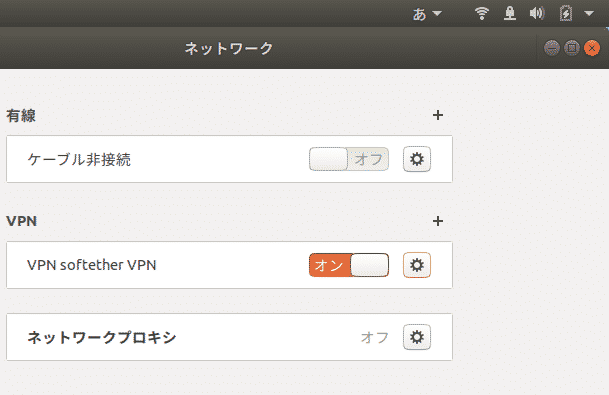
アルゴリズムを設定。
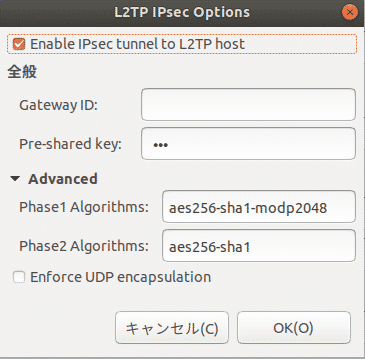
VPNがオンになり右上に鍵マークが表示されVPN接続が開始された。
まとめ
適当に設定して気持ち悪かったが、アルゴリズムの設定のプロセスが見えたことで気持ち悪さはなくなった。
余力がある人は出てきたアルゴリズムのパターンを色々試してみるといいかもしれない。
ちなみにubuntuの端末のスクショをファイルサーバ経由でMacに持ってきているのだが、ストレスフリーで非常にファイルサーバの効果を実感した。